Start Staking
Written By James Tolan
Last updated About 13 hours ago
Get started
Check Assets & Chains to see where your asset is supported and how exits work.
For in-app staking, open the Nansen staking dashboard, choose the network and select Stake. For off-app staking, open its listed portal and select the Nansen validator where supported.
Review the commission, lock-up or withdrawal wait, and minimum. Leave enough native tokens for network fees before confirming.
Rewards and fees
APY is an annualized estimate, not a guaranteed return. It can change with network inflation, how much of the supply is staked, and how that network distributes fees. Some assets compound automatically; others require claiming and restaking. Commission varies by network. See Assets & Chains and check the dashboard’s fee breakdown.
Nansen charges different fees for each staking network due to the amount of resources required to maintain the node. The fees charged are shown on under each individual asset in Assets & Chains.
Bonding and Unbonding
Bonding locks assets into a staking position. A network may wait before a position becomes active and earns rewards. Unbonding begins an exit; the asset may not be transferable until the waiting period ends. With fixed-term staking, an early exit may not be available.
Risk and coverage
A network can penalize downtime or misconduct such as signing conflicting blocks. Rules differ by network. Read Staking Security and the relevant vault disclosure.
Validator uptime risk: Stakes will be slashed by a small % (usually 0.01%) if your chosen validator misses more than X% of Y blocks. Every protocol is slightly different.
Malicious validator actions: Double signing a block, will result in a large % slash on all stakes with the malicious validator, emphasising the importance of picking a time-tested & trustworthy validator like Nansen.
We have a 100% SLA on uptime and zero double-signing incidents to date. Please note, we do not have insurance for double-signing.
About nxSOL
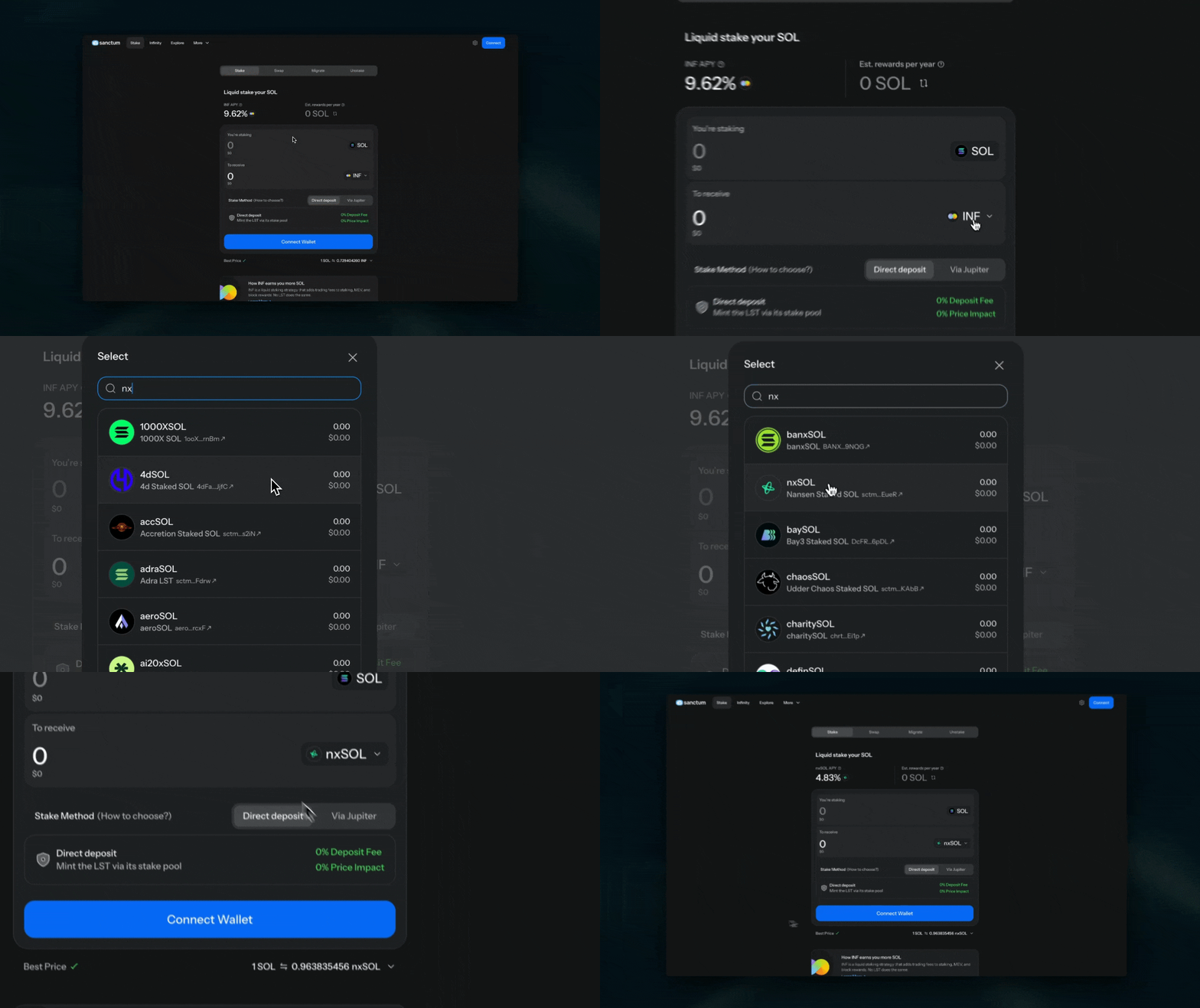
nxSOL is a liquid staking token for Solana launched by Nansen in partnership with Sanctum. It allows you to earn SOL staking rewards while maintaining full liquidity - no lockup periods required.
Stake SOL through Sanctum to receive nxSOL
nxSOL is a liquid staking token that represents your staked position and continues to accrue staking rewards
nxSOL can be used in DeFi protocols like Kamino to earn additional yield
The benefits of nxSOL include:
Earning SOL staking yields with no lockup
Full liquidity and composability across Solana DeFi
Supports Solana's decentralization and security
All nxSOL positions are being tracked and may receive Nansen Points at a later date, distributed retroactively.
Sanctum: Solana's largest liquid staking infrastructure with nearly $3 billion AUM
Kamino Finance: DeFi protocol on Solana that allows user to earn yield on assets
Common questions
I can’t find an existing stake. Where is it?
I can’t find an existing stake. Where is it?
Check the network in Assets & Chains. If it is no longer managed in Nansen, follow its external route using the original wallet.
How do I connect my staking wallet is linked to another email?
How do I connect my staking wallet is linked to another email?
Sign in with the original account first. If you need to move the link and have not redeemed Points rewards, Support can review whether it can be disconnected. A wallet can only be linked to one account.
Does Nansen offer Hyperliquid peering?
Does Nansen offer Hyperliquid peering?
Yes, Nansen offers direct Sentry peering. Email Support to be routed to Sales.
Was this helpful?
Still need help? Share an idea