Wallet
Written By James Tolan
Last updated About 14 hours ago
Once trading is enabled an embedded Nansen Wallet powered by Privy is generated for you. You can have only one wallet per chain supported and you cannot import external wallets to Nansen.
Depositing Funds
On Nansen web app:
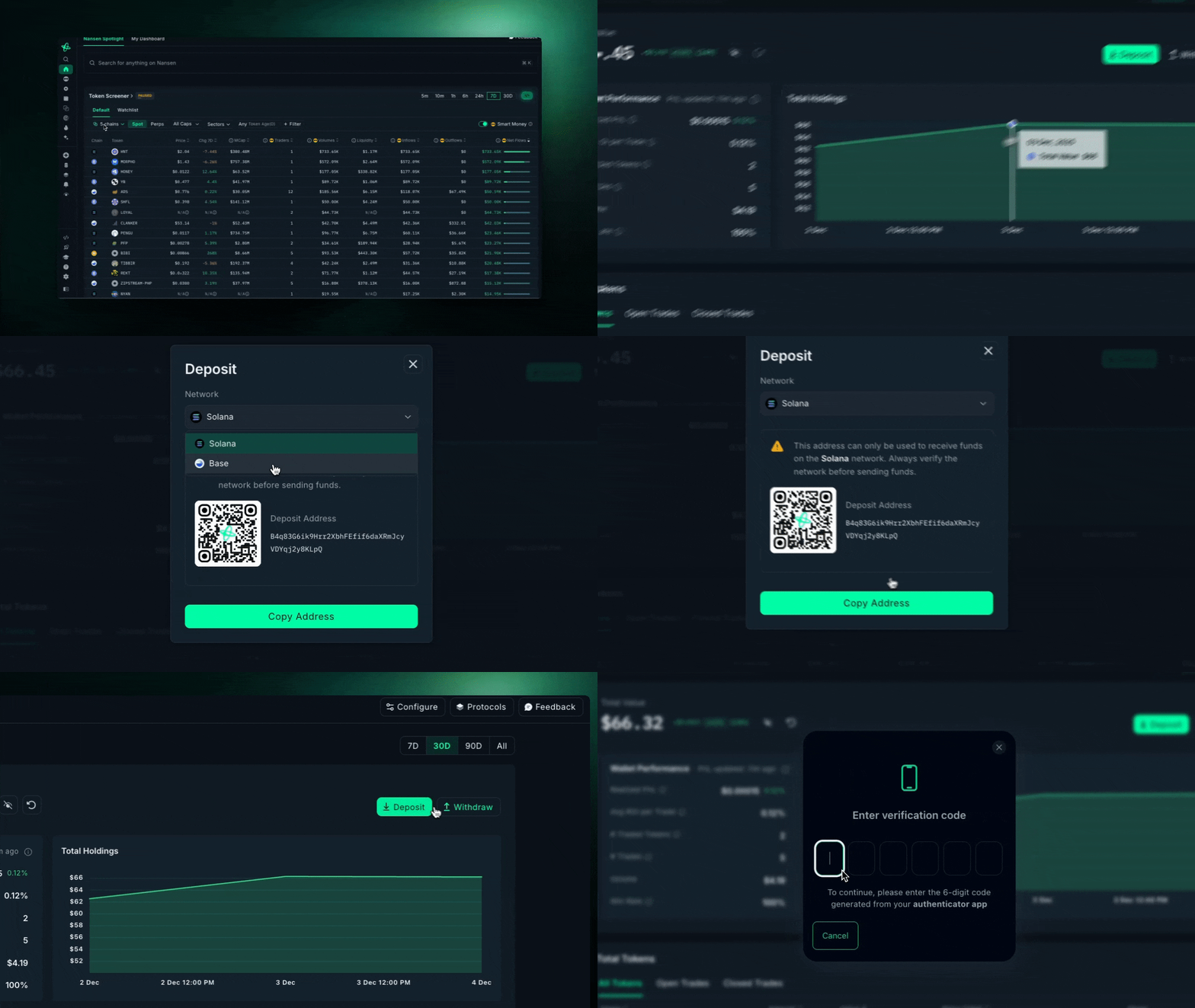
Go to Portfolio and choose to Deposit
When depositing, select your network
When withdrawing, make sure to have MFA activated, and verify the code
📱 On Nansen Mobile:
Open your Profile on the right hand side and click the Deposit button
You can choose from crypto, card, an exchange or Apple Pay
Please note that when you’re depositing with a card or using Apple Pay you may be required to complete KYC, particularly when over $1k is deposited within 12 months.
Withdrawing
If you can’t find your funds after withdrawing from Nansen, follow these steps:
Verify that the withdrawal transaction has been complete onchain
Double check you withdrew your funds to the right address
If you’ve done both of these and still cannot locate your funds, please reach out to support@nansen.ai with your address and where you were trying to withdraw your funds to.
Security
Nansen Wallet is non-custodial and powered by Privy, a trusted brand in the crypto space.
What that means:
You control your keys (we never access them)
Powered by Privy’s secure infrastructure
Multi-factor authentication
We don't custody your funds
We recommend only moving what you want to trade. Treat Nansen Wallet like a trading account, not your main vault. Nansen Wallet is for active trading. Keep long-term holdings in a hardware wallet or other kind of cold wallet.
Security is always a shared responsibility. To enhance you’re account security we recommend that you:
Enable MFA (recommended)
Never share your credentials
Review transaction details before confirming
Withdraw to cold storage if holding long-term
Risk & Compliance
Due to legal or regulatory reasons, access to and use of our Services may be restricted in the following jurisdictions:
Generally, the Gelephu Mindfulness City Special Administrative Region and the Kingdom of Bhutan, Singapore, Cuba, Iran, North Korea, Syria, and certain regions in Ukraine (including Crimea, Donetsk, and Luhansk).
For the Perpetuals Feature (as defined below), in addition to the jurisdictions identified in item 1 above, the United States and the United Kingdom.
For the Outcomes Feature (as defined below), in addition to the jurisdictions identified in item 1 above, the United States, the United Kingdom, Australia, Thailand, China, India, Brazil, Indonesia, Poland, Hungary, the Netherlands, Belgium, Switzerland, Argentina and Ireland.
Do not use a VPN to bypass geographic restrictions - this violates Nansen's Terms of Service.
To comply with UK financial regulations, Nansen has removed its mobile app from the UK App Store and restricted trading features for users in the United Kingdom. This affects spot trading, Hyperliquid perps, and swaps.
Common Questions
Is Nansen Wallet safe?
Is Nansen Wallet safe?
Nansen Wallet is non-custodial. Powered by Privy, a trusted brand in the crypto space.
What if Nansen gets hacked?
What if Nansen gets hacked?
Keys are encrypted and stored using Privy’s infrastructure (the same security model as MetaMask). If you enable MFA, even if Nansen were to get hacked, keys won’t be accessible.
Even if our servers were compromised, attackers couldn't access your wallet keys. You'd need to compromise Privy’s infrastructure separately, which uses industry-standard security practices.
That said, security is always a shared responsibility:
Enable MFA (recommended)
Don't share your credentials
Review transaction details before confirming
Withdraw to cold storage if holding long-term
Why isn’t my MFA passkey working?
Why isn’t my MFA passkey working?
The most common issue is that a passkey has been been created and stored on a different device or in a password manager that isn’t available on your current device or browser.
For example, a passkey created in a desktop browser extension may not automatically work in the Nansen mobile app on an iPhone.
For the best experience across the Nansen mobile and web app, save your passkey with a password manager that syncs across your devices, such as Apple Passwords, Google Password Manager, or 1Password.
What happens to my funds if I lose access to my Nansen account?
What happens to my funds if I lose access to my Nansen account?
Your funds are stored onchain in your embedded wallet, so they don’t disappear if you lose access to your Nansen account.
If you can’t log in, start with standard account recovery (e.g. email/password reset). In some cases, additional verification may be required to restore access safely.
I can't withdraw my funds—what do I do?
I can't withdraw my funds—what do I do?
If you’re trying to withdraw your funds please reach out to support@nansen.ai and share:
Nansen wallet address
Withdrawal chain
Error you're seeing
Screenshot or video where possible
The Support team will help you get to the bottom of this.
Was this helpful?
Still need help? Share an idea