General Support & Contact Us
Written By Nansen Team
Last updated 21 days ago
What are your official channels?
Remember, crypto is full of scammers and imitators. Remain vigilant! Any links that are not from nansen.ai may be phishing or scams. Only click links after verifying their legitimacy through our official website nansen.ai, our verified channels (@nansen_ai), or our official Discord.
Official Website (nansen.ai)
X/Twitter (@nansen_ai, @nansen_intern)
Telegram (nansen_digest)
LinkedIn (nansen_ai)
Youtube (nansen_ai)
How to contact Nansen support?
If you want to get in contact with Nansen support please email support@nansen.ai.
What to include when submitting feedback?
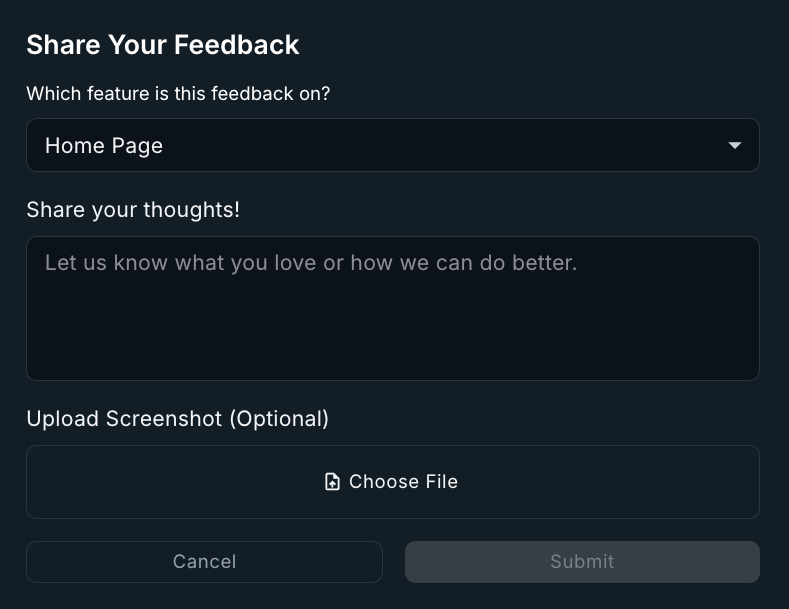
When submitting a ticket, make sure to include as much detail as possible. The clearer we are on what it is you are trying to solve or bring to our attention, the better. From the feedback form, you have option to include:
Name of feature this feedback is on (select from dropdown)
Details on what needs to be fixed or attended to
Upload screenshot to help us better understand where and what is the problem
How long does support take to reply?
We’ll try to get back to you within 24-hours on working business days (if its a holiday, we may take a bit more time).
I forgot my password—how do I change it?
You can change your Nansen account password by using this password reset link. Follow the instructions to set up a new password.
Why can't I connect my staking wallet to my account? It says it's already linked to another email.
Each wallet can only be linked to one account at a time to maintain Points system integrity and prevent exploitation.
To resolve this, here are your options:
Option 1: Sign in using the original account connected to the staking wallet to access your existing account and Points.
Option 2: Disconnecting the wallet from the original account so that it can be connected to a new account.
If you want to disconnect your wallet contact our support team—they can help you disconnect wallets and guide you through the reconnection process.
Important Note: Once Points rewards have been redeemed, wallet connections cannot be changed.
How do I add an email to my wallet account?
Login with your wallet account and go to Account Settings. Click the green “Add Email” button to attach an email to your wallet account.
The email cannot be attached to another account. If the email is already attached to an account you will need to contact support and request for the email account to be deleted.
Where can I submit a request for vendor due diligence or a SOC report?
Email Nansen Support with details about the product or service you are interested in and the information you need. Our Support team will connect you with the appropriate member of our Sales team.
Please note that due diligence requests are not available for self-service subscriptions. They may be available to entities interested in Nansen’s staking, trading, or API offerings.
Can’t login? Contact Nansen Support
Wallet logins were migrated on March 31, 2026. We’ve upgraded our login system to offer a faster, more reliable sign-in experience. Wallet login now supports EVM and Solana wallets only. Google, Apple, and email login are not affected.
If you previously signed in with a wallet on another chain (Cosmos, Starknet, Sui, Tron, or Aptos), you’ll need to link a new login method. As the migration date has passed you will now need to contact support to assist you.
If your only login method was an unsupported wallet and you can’t sign in, please email support@nansen.ai with the following details:
Address(es) that you’ve lost access to
Wallets used to sign (eg. Coinbase, Kelp, Slush etc.)
Any additional account details you can remember
From there our support team will be happy to help you restore access to your account!
Can I still use a wallet to sign up to Nansen?
No, wallets can not be used to sign up to Nansen. This is part of an upcoming to remove wallet authentication.
Was this helpful?
Still need help? Share an idea