Security, Trust, & Troubleshooting
Written By Nansen Team
Last updated 18 days ago
Is Nansen Wallet safe?
Nansen Wallet is non-custodial. Powered by Privy, a trusted brand in the crypto space.
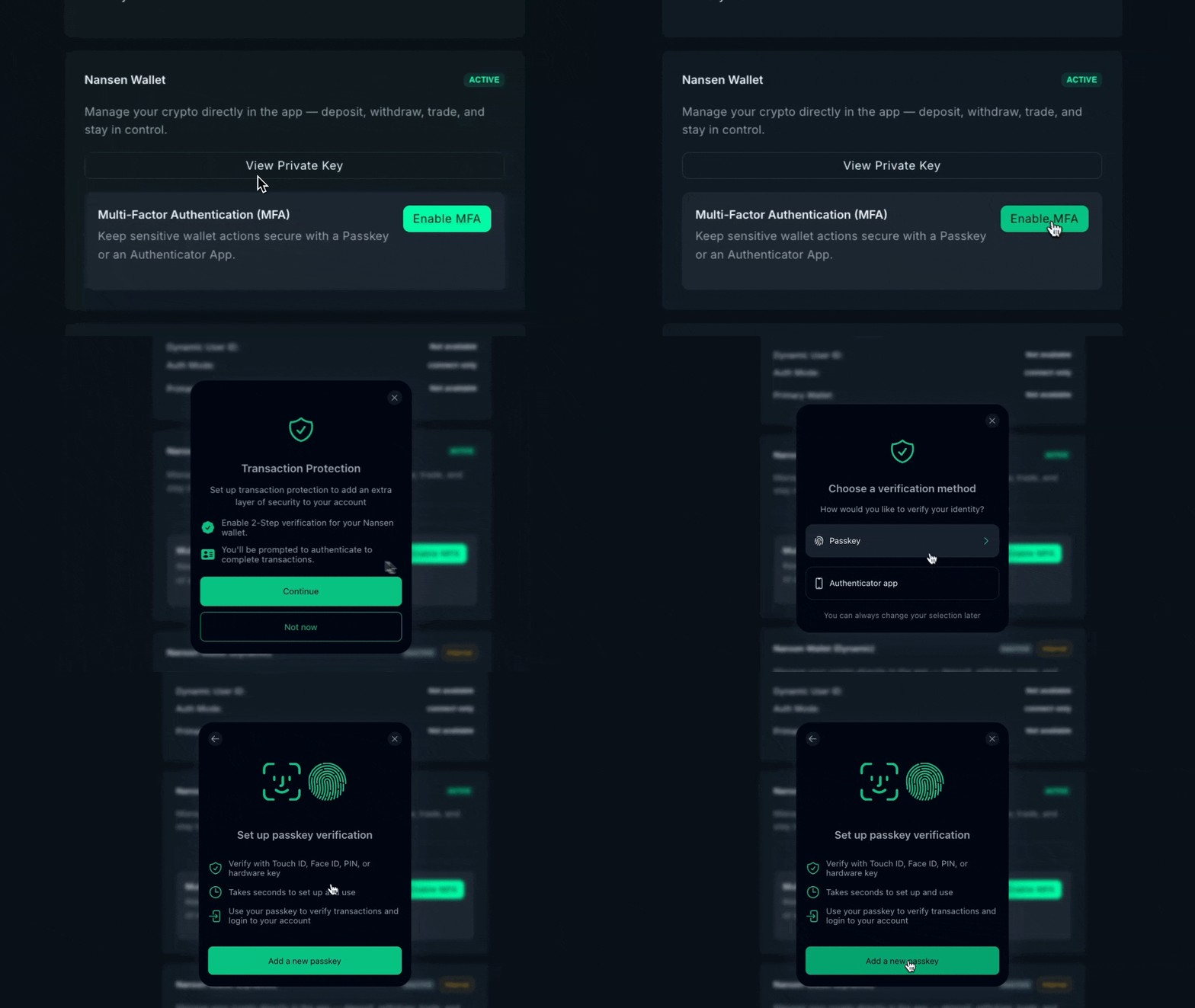
What that means:
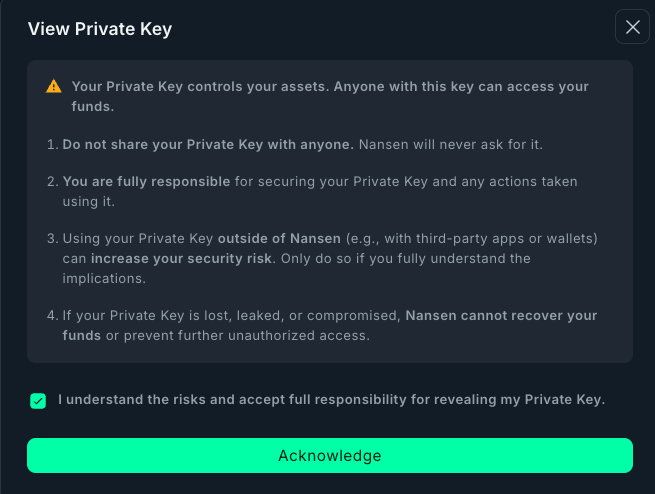
You control your keys (we never access them)
Powered by Privy’s secure infrastructure
Multi-factor authentication
We don't custody your funds
You're in full control. The wallet just makes execution seamless within Nansen. Think of it like using MetaMask, but integrated so you don't have to switch apps.
What if Nansen gets hacked?
We can't access your keys. They're encrypted and stored using Privy’s infrastructure (the same security model as MetaMask). Even if Nansen were to get hacked, keys won’t be accessible due to MFA (if you have it enabled).
Even if our servers were compromised, attackers couldn't access your wallet keys. You'd need to compromise Privy’s infrastructure separately, which uses industry-standard security practices.
That said, security is always a shared responsibility:
Enable MFA (recommended)
Don't share your credentials
Review transaction details before confirming
Withdraw to cold storage if holding long-term
Why isn’t my MFA passkey working?
The most common issue is that a passkey has been been created and stored on a different device or in a password manager that isn’t available on your current device or browser.
For example, a passkey created in a desktop browser extension may not automatically work in the Nansen mobile app on an iPhone.
For the best experience across the Nansen mobile and web app, save your passkey with a password manager that syncs across your devices, such as Apple Passwords, Google Password Manager, or 1Password.
I forgot where I stored my MFA passkey—what do I do?
Contact us at support@nansen.ai. Our support team can help identify the type of passkey associated with your account so you know where to look for it.
Can I use my existing MetaMask/Phantom wallet instead?
Not for trading right now. Trading uses Nansen Wallet for the seamless experience:
There will be gas fees on Ethereum but not Base or Solana, only if you dont have the native token.
Instant setup across web and mobile
Automatic syncing
But you don't need to move all your funds. Just send what you want to trade.
Portfolio tracking works with any wallet—MetaMask, Phantom, Ledger, whatever. You can track your full holdings without moving anything.
We're logging requests for external wallet support for trading. If enough users want it, we'll consider adding external wallet integration.
What happens to my funds if I lose access to my Nansen account?
Your funds are stored onchain in your embedded wallet, so they don’t disappear if you lose access to your Nansen account.
If you can’t log in, start with standard account recovery (e.g. email/password reset). In some cases, additional verification may be required to restore access safely.
My transaction is stuck. What do I do?
On EVM chains:
Check network status (etherscan.io or equivalent)
If network is congested, it may just take longer (up to 30 minutes during high traffic)
If stuck >30 minutes, contact support with transaction hash
On Solana:
Transactions either confirm or fail quickly (no 'stuck' state)
If failed, error message explains why
Don't submit another transaction while one is pending- it can cause conflicts.
I got an error: 'Insufficient liquidity.' What does that mean?
The DEX pools don't have enough tokens to complete your trade at the quoted price.
Solutions:
Reduce trade size (try 50% of intended amount)
Increase slippage tolerance (allows more price movement)
Wait for more liquidity (check back in a few hours)
Low-cap tokens often have liquidity issues. Stick to higher-volume tokens for large trades.
⚠️ The current list of jurisdictions are restricted from accessing trading: Singapore, Cuba, Iran, North Korea, Syria, Ukraine regions (Crimea, Donetsk, and Luhansk), Russia
I withdrew my funds from Nansen, but I can’t find my funds. How do I find my withdrawal?
If you can’t find your funds after withdrawing from Nansen, follow these steps:
Verify that the withdrawal transaction has been complete onchain
Double check you withdrew your funds to the right address
If you’ve done both of these and still cannot locate your funds, please reach out to support@nansen.ai with your Hyperliquid wallet address.
I can't withdraw my funds—what do I do?
If you’re trying to withdraw your funds please reach out to support@nansen.ai and share:
Nansen wallet address
Withdrawal chain
Error you're seeing
Screenshot or video where possible
The Support team will help you get to the bottom of this.